Sunday, October 26, 2025

Python script to access a machine behind SSH


"""Utility to reach a TCP server behind an SSH jump host.


This script establishes an SSH tunnel to a remote host and forwards a

local port to a TCP service that is only reachable from that host. Once

the tunnel is up, you can interact with the remote service using the

local forwarding port.


Example

-------

+python ssh_tunnel_client.py \

+    --ssh-host jump.example.com --ssh-user alice --ssh-key ~/.ssh/id_rsa \

+    --remote-host 10.0.0.5 --remote-port 5012

+

+The script will open localhost:5012 by default; any TCP client pointed to

+that address/port pair will effectively communicate with 10.0.0.5:5012

+through the SSH tunnel.

+"""

+from __future__ import annotations

+

+import argparse

+import getpass

+import logging

+import socketserver

+import sys

+from typing import Optional, Tuple

+

+import paramiko

+

+

+LOGGER = logging.getLogger(__name__)

+

+

+class ForwardServer(socketserver.ThreadingTCPServer):

+    daemon_threads = True

+    allow_reuse_address = True

+

+

+class TunnelHandler(socketserver.BaseRequestHandler):

+    """Forwards a local TCP connection through the SSH transport."""

+

+    def handle(self) -> None:  # noqa: D401 - see class docstring.

+        transport: paramiko.Transport = self.server.transport  # type: ignore[attr-defined]

+        remote_host: str = self.server.remote_host  # type: ignore[attr-defined]

+        remote_port: int = self.server.remote_port  # type: ignore[attr-defined]

+

+        try:

+            chan = transport.open_channel(

+                "direct-tcpip",

+                (remote_host, remote_port),

+                self.request.getsockname(),

+            )

+        except Exception as exc:  # pragma: no cover - network specific

+            LOGGER.error("Failed to open SSH channel: %s", exc)

+            return

+

+        if chan is None:

+            LOGGER.error("SSH channel creation returned None")

+            return

+

+        LOGGER.info(

+            "Forwarding connection from %s to %s:%s",

+            self.client_address,

+            remote_host,

+            remote_port,

+        )

+

+        try:

+            while True:

+                rdata = self.request.recv(1024)

+                if len(rdata) == 0:

+                    break

+                chan.sendall(rdata)

+

+                response = chan.recv(1024)

+                if len(response) == 0:

+                    break

+                self.request.sendall(response)

+        finally:

+            chan.close()

+            self.request.close()

+

+

+def parse_args(argv: Optional[list[str]] = None) -> argparse.Namespace:

+    parser = argparse.ArgumentParser(description=__doc__)

+    parser.add_argument("--ssh-host", required=True, help="SSH jump host")

+    parser.add_argument("--ssh-port", type=int, default=22, help="SSH port")

+    parser.add_argument("--ssh-user", required=True, help="SSH username")

+    parser.add_argument(

+        "--ssh-key",

+        help="Path to private key for authentication (optional if password is provided)",

+    )

+    parser.add_argument(

+        "--ssh-password",

+        help="Password for SSH authentication (optional if key is provided)",

+    )

+    parser.add_argument(

+        "--remote-host",

+        required=True,

+        help="Destination host reachable from the SSH server",

+    )

+    parser.add_argument(

+        "--remote-port",

+        type=int,

+        default=5012,

+        help="Destination TCP port on the remote host",

+    )

+    parser.add_argument(

+        "--local-port",

+        type=int,

+        default=5012,

+        help="Local port for the forwarded connection",

+    )

+    parser.add_argument(

+        "--verbose",

+        action="store_true",

+        help="Enable debug logging",

+    )

+    return parser.parse_args(argv)

+

+

+def create_ssh_client(args: argparse.Namespace) -> paramiko.SSHClient:

+    client = paramiko.SSHClient()

+    client.load_system_host_keys()

+    client.set_missing_host_key_policy(paramiko.WarningPolicy())

+    password = args.ssh_password

+    if password is None and args.ssh_key is None:

+        password = getpass.getpass("SSH password: ")

+

+    client.connect(

+        args.ssh_host,

+        port=args.ssh_port,

+        username=args.ssh_user,

+        key_filename=args.ssh_key,

+        password=password,

+        look_for_keys=args.ssh_key is None and password is None,

+    )

+    return client

+

+

+def start_forwarding(

+    client: paramiko.SSHClient,

+    remote_host: str,

+    remote_port: int,

+    local_port: int,

+) -> Tuple[ForwardServer, Tuple[str, int]]:

+    transport = client.get_transport()

+    if transport is None or not transport.is_active():

+        raise RuntimeError("SSH transport is not available")

+

+    server = ForwardServer(("127.0.0.1", local_port), TunnelHandler)

+    server.transport = transport  # type: ignore[attr-defined]

+    server.remote_host = remote_host  # type: ignore[attr-defined]

+    server.remote_port = remote_port  # type: ignore[attr-defined]

+    return server, server.server_address

+

+

+def main(argv: Optional[list[str]] = None) -> int:

+    args = parse_args(argv)

+

+    logging.basicConfig(

+        level=logging.DEBUG if args.verbose else logging.INFO,

+        format="%(asctime)s %(levelname)s %(name)s: %(message)s",

+    )

+

+    try:

+        client = create_ssh_client(args)

+    except paramiko.AuthenticationException as exc:

+        LOGGER.error("Authentication failed: %s", exc)

+        return 1

+    except paramiko.SSHException as exc:

+        LOGGER.error("Unable to establish SSH connection: %s", exc)

+        return 1

+

+    LOGGER.info(

+        "Connected to %s. Forwarding localhost:%d to %s:%d",

+        args.ssh_host,

+        args.local_port,

+        args.remote_host,

+        args.remote_port,

+    )

+

+    try:

+        server, local_address = start_forwarding(

+            client,

+            args.remote_host,

+            args.remote_port,

+            args.local_port,

+        )

+    except Exception as exc:

+        LOGGER.error("Failed to start port forwarding: %s", exc)

+        client.close()

+        return 1

+

+    LOGGER.info("Tunnel established on %s:%d", *local_address)

+

+    try:

+        server.serve_forever()

+    except KeyboardInterrupt:

+        LOGGER.info("Interrupted by user, shutting down")

+    finally:

+        server.server_close()

+        client.close()

+

+    return 0

+

+

+if __name__ == "__main__":

+    sys.exit(main())


Sunday, June 8, 2025

DISTCC: client did not provide distcc magic fairy dust

 I get these errors from distccd (in detach mode) everytime distcc client wants to distribute some jobs to do:


istccd[14791] (dcc_create_kids) up to 1 children
distccd[14791] (dcc_create_kids) up to 2 children
distccd[14791] (dcc_create_kids) up to 3 children
distccd[14791] (dcc_create_kids) up to 4 children
distccd[14791] (dcc_create_kids) up to 5 children
distccd[14791] (dcc_create_kids) up to 6 children
distccd[14791] (dcc_create_kids) up to 7 children
distccd[14791] (dcc_create_kids) up to 8 children
distccd[14791] (dcc_create_kids) up to 9 children
distccd[14791] (dcc_create_kids) up to 10 children
distccd[14791] (dcc_create_kids) up to 11 children
distccd[14791] (dcc_create_kids) up to 12 children
distccd[14791] (dcc_create_kids) up to 13 children
distccd[14791] (dcc_create_kids) up to 14 children
distccd[14792] (dcc_check_client) connection from 192.168.100.218:36956
distccd[14792] (check_address_inet) match client 0xda64a8c0, value 0x64a8c0, mask 0xffffff
distccd[14792] (dcc_readx) ERROR: unexpected eof on fd4
distccd[14792] (dcc_r_token_int) ERROR: read failed while waiting for token "DIST"
distccd[14792] (dcc_r_request_header) ERROR: client did not provide distcc magic fairy dust
distccd[14792] (dcc_cleanup_tempfiles_inner) deleted 3 temporary files
distccd[14792] (dcc_job_summary) client: 192.168.100.218:36956 OTHER exit:0 sig:0 core:0 ret:108 time:0ms 
distccd[14793] (dcc_check_client) connection from 192.168.100.218:40390
distccd[14793] (check_address_inet) match client 0xda64a8c0, value 0x64a8c0, mask 0xffffff
distccd[14793] (dcc_readx) ERROR: unexpected eof on fd4
distccd[14793] (dcc_r_token_int) ERROR: read failed while waiting for token "DIST"
distccd[14793] (dcc_r_request_header) ERROR: client did not provide distcc magic fairy dust
distccd[14793] (dcc_cleanup_tempfiles_inner) deleted 3 temporary files
distccd[14793] (dcc_job_summary) client: 192.168.100.218:40390 OTHER exit:0 sig:0 core:0 ret:108 time:0ms 


From distcc source code:

/**
 * Read a token and value.  The receiver always knows what token name
 * is expected next -- indeed the names are really only there as a
 * sanity check and to aid debugging.
 *
 * @param ifd      fd to read from
 * @param expected 4-char token that is expected to come in next
 * @param val      receives the parameter value
 **/
int dcc_r_token_int(int ifd, const char *expected, unsigned *val)
{
    char buf[13], *bum;
    int ret;
    if (strlen(expected) != 4) {
        rs_log_error("expected token \"%s\" seems wrong", expected);
        return EXIT_PROTOCOL_ERROR;
    }
    if ((ret = dcc_readx(ifd, buf, 12))) {
        rs_log_error("read failed while waiting for token \"%s\"",
                    expected);
        return ret;
    }


Monday, February 3, 2025

Python script to find duplicate files

Here is a Python script that scans directories for duplicate files by comparing file sizes and MD5 hashes:


import os
import hashlib
from collections import defaultdict
import argparse
def get_file_hash(filepath):
    """Calculate the MD5 hash of a file's content."""
    hasher = hashlib.md5()
    try:
        with open(filepath, 'rb') as f:
            while True:
                chunk = f.read(8192)  # Read in 8KB chunks to handle large files
                if not chunk:
                    break
                hasher.update(chunk)
    except IOError:
        return None  # Skip files that can't be read
    return hasher.hexdigest()
def find_duplicates(start_directory):
    """Find duplicate files in the specified directory and its subdirectories."""
    file_sizes = defaultdict(list)
    
    # First pass: Group files by size
    for root, dirs, files in os.walk(start_directory):
        for filename in files:
            filepath = os.path.join(root, filename)
            try:
                file_size = os.path.getsize(filepath)
            except OSError:
                continue  # Skip inaccessible files
            file_sizes[file_size].append(filepath)
    
    # Second pass: Compare hashes of files with the same size
    duplicates = []
    for size, paths in file_sizes.items():
        if len(paths) < 2:
            continue  # Skip unique file sizes
        
        hashes = defaultdict(list)
        for path in paths:
            file_hash = get_file_hash(path)
            if file_hash is not None:
                hashes[file_hash].append(path)
        
        # Collect all groups of identical files
        for hash_group in hashes.values():
            if len(hash_group) > 1:
                duplicates.append(hash_group)
    
    return duplicates
if __name__ == "__main__":
    parser = argparse.ArgumentParser(description='Find duplicate files in a directory tree.')
    parser.add_argument('directory', help='Directory to scan for duplicates')
    args = parser.parse_args()
    if not os.path.isdir(args.directory):
        print(f"Error: '{args.directory}' is not a valid directory")
        exit(1)
    duplicate_groups = find_duplicates(args.directory)
    if duplicate_groups:
        print("\nDuplicate files found:")
        for i, group in enumerate(duplicate_groups, 1):
            print(f"\nGroup {i}:")
            for path in group:
                print(f"  {path}")
        print(f"\nFound {len(duplicate_groups)} groups of duplicates")
    else:
        print("\nNo duplicate files found")


Key features:

1. Uses two-pass comparison for efficiency:

   - First groups files by size

   - Then compares MD5 hashes of same-size files

2. Handles large files using chunked reading

3. Skips inaccessible files gracefully

4. Provides clear command-line output

5. Uses MD5 hashing for content comparison


To use:

1. Save as `find_duplicates.py`

2. Run with: `python find_duplicates.py /path/to/directory`


The script will:

1. Scan all subdirectories recursively

2. Identify files with identical content

3. Group duplicates together in the output

4. Show full paths of duplicate files


Note: MD5 is used for speed, but you could modify the script to use SHA-256 for cryptographic-strength hashing by replacing `hashlib.md5()` with `hashlib.sha256()`.

Sunday, December 15, 2024

Some bit manipulations

 This C++ code has bits access routines to get and set some bits:


dataBits.h:


#include <cstdint>
#include <iostream>

template <typename T>
class DataBits
{
public:
DataBits(T v=0) : m_data(v) {};
        
        T get() const { return m_data; }

        void set(T v) { m_data = v; }

        // 0-based
        template <typename TB>
static constexpr TB BitMask(int startpos, int endpos)
{
return TB((1<<(endpos-startpos+1))-1) << startpos;
        }

        constexpr T GetBits(int startpos, int endpos)
        {
            return (m_data & BitMask<T>(startpos, endpos)) >> startpos;
        }

        void SetBits(int startpos, int endpos, T newData)
        {
            auto mask = BitMask<T>(startpos, endpos);
            m_data = (m_data & ~mask) | ((newData << startpos) & mask);
        }

private:
    T  m_data;

};


main.cpp:

#include <iostream>
#include <format>
#include <bitset>
#include <iomanip>
#include "dataBits.h"


int main()
{
    std::cout << std::format("{:#04x}", 0x0e) << std::endl;
    std::cout << "BitMask[1..3] = " << std::hex << "0x" << DataBits<uint32_t>::BitMask<uint32_t>(1,3) << std::endl;

    DataBits bits = 0b1110101001010011;
    std::cout << "bits = " << std::setw(55) << std::bitset<32>(bits.get()) << std::endl;
    auto newbits = 0b010;
    bits.SetBits(13, 15, newbits);
    std::cout << "bits with bits[13..15]=" << std::bitset<3>(newbits) << " -> " << std::bitset<32>(bits.get()) << std::endl;
    std::cout << "BitMask[1..3] = " << std::hex << "0x" << DataBits<uint32_t>::BitMask<uint32_t>(1,3) << std::endl;
    std::cout << "data @bits[13..15] = " << std::bitset<3>(bits.GetBits(13,15)) << std::endl;
    return 0;
}


Saturday, February 5, 2022

Solution to Weak Sound from Maono USB/XLR HD300T Microphone

 I bought a USB/XLR Dynamic Microphone "Maono HD-300T" from Amazon a few months ago and was disappointed with its low or quiet sound made by my Windows 11 when connected through its USB connection.  I tested the microphone through its XLR connection to my Yamaha Audio mixer, no phantom power is needed (as this is a dynamic microphone), but I had to set the preamp gain all the way to its max to get a decent volume.

The volume setting was set to 100%, but I had no luck making it better. I was thinking perhaps it required a special USB driver, but nope, it simply used the stock Windows driver (Maono's official website doesn't mention anything about a special driver for this particular model).

At one point I gave up on using it for my video conferences and meetings and back to just using the built-in microphone on my webcam (Logitech HD 920).  Last week I found an idea to test the microphone using my PC analog microphone input.  I found and bought an XLR-to-3.5mm TRS which is perfect to connect the microphone to my PC.  The good thing with built-in audio from motherboard is that Windows support boost gain to +30 dB, so I was able to make the microphone work properly.

Not being satisfied with that one solution, I googled around and found somebody mentioned about Equalizer APO and its accompanying UI interface, Peace Equalizer APO.  Got them installed and ran, I then connected my Microphone to one of my PC's USB.  After playing around on how to use it (It's a lot of parameter controls and kind of confusing, at least for beginners), I managed to boost the gain of the microphone to + 3- dB. Hooray!

Below is my settings (I saved it as "My Microphone mono" settings.  It is based on the "Microphone mono" preset configuration.):


Set the preamp to gain around +20 dB.  As can be seen, I turn on "Prevent Clipping" down below, so even if set it to the max (+30 dB gain), we shouldn't get the audio clipped.  The downside to crank it up to the max is we'd also get louder noise.


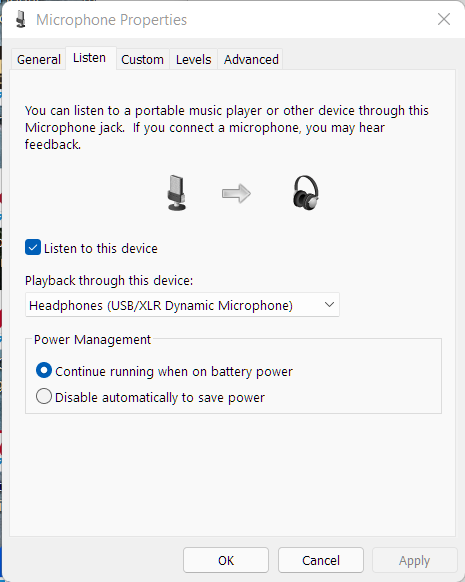
I configure the audio to live play back to its headphone connector (so I can hear my own voice for monitoring purposes):


The level is always set to 100% in this pane:


Saturday, December 18, 2021

2.5 Gbps Ethernet slowing down

 I was having issues again with the unexpected slowness of my internet access.  This time turns out due to failure in ethernet auto-negotiation.  My PC's ethernet interface is 2.5 Gbps, as well MoCA adapter that is connected to it.  It was working fine, until yesterday, where I got only 90's Mbps on SpeedTest.

There is cool PowerShell command to display the link speed: Get-NetAdapter.

We can create a DOS shell wrapper, so invoking this from a regular DOS prompt would work.

For example, I put this command in a file called "getnet.ps1".  I created another DOS script called "getnet.cmd" with the content of it just calling getps1.ps1:


In getnet.ps1:

Get-NetAdapter


In getnet.cmd:

call getnet.ps1


For example:

C:\Users\anon\bin>type getnet.cmd

call getnet.ps1


C:\Users\lshih\bin>getnet


C:\Users\lshih\bin>call getnet.ps1


Name                      InterfaceDescription                    ifIndex Status       MacAddress             LinkSpeed

----                      --------------------                    ------- ------       ----------             ---------

Bluetooth Network Conn... Bluetooth Device (Personal Area Netw...      27 Disconnected 38-FC-98-13-E9-2A         3 Mbps

2.5 GigE LAN              Realtek Gaming 2.5GbE Family Contr...#2      21 Up           04-42-1A-0C-2C-C4       2.5 Gbps

vEthernet (2.5 GigE LAN)  Hyper-V Virtual Ethernet Adapter             16 Up           00-15-5D-76-F1-69        10 Gbps

vEthernet (1 GigE LAN)    Hyper-V Virtual Ethernet Adapter #3          52 Up           00-15-5D-D2-5B-EB        10 Gbps

1 GigE LAN                Intel(R) I211 Gigabit Network Conn...#2      14 Up           04-42-1A-0C-2C-C3         1 Gbps

vEthernet (VirtualBox ... Hyper-V Virtual Ethernet Adapter #2          40 Up           00-15-5D-F1-53-24        10 Gbps

VirtualBox Host-Only N... VirtualBox Host-Only Ethernet Adapter         7 Up           0A-00-27-00-00-07         1 Gbps

vEthernet (WSL)           Hyper-V Virtual Ethernet Adapter #4          75 Up           00-15-5D-9C-4E-D0        10 Gbps


Friday, December 17, 2021

Chinese Hackers are now the top of the list

 My gateway router has a cool security feature called Intrusive Threat Prevention (ITS).  When I checked the statistics from where most of the attacks occurred to my gateway, majority the attacks come from China.


Friday, December 10, 2021

What is the maximum Transmit Power sent by 5G Iphone?

 I have been wondering so far how much power a 5G phone, like iPhone 12, can transmit to RAN (Radio Access Network), a.k.a. a base station.

According to the table in standard document ETSI TS 138 101-1, section 6.2.1 for "UE maximum output power", the maximum power for class 2 is 26 dBm (0.398 Watt) and for class 3 is 23 dBm (0.199 Watt).  Class 2 UE (User Element) only transmits at certain frequency bands only, namely n41, n77, n78, and n79, while class 3 transmits in all spectrums.


As stated, the period of measurement shall be at least one sub-frame (sfn, 1ms). 

The above maximum value is rarely reached unless the signal reception by UE or BS (Base station) is too weak.

To understand what are those NR bands, see 5G NR frequency bands - Wikipedia


Tuesday, November 30, 2021

Enabling Older Key Algorithms in SSH

Supposedly the server we want to access is at address 192.168.1.11 and it only supports older key hash algorithms.  Add those algorithms in ~/.ssh/config, such as:


 Host 192.168.1.11
        KexAlgorithms +diffie-hellman-group1-sha1,diffie-hellman-group-exchange-sha1,diffie-hellman-group14-sha1
        PubkeyAcceptedAlgorithms +ssh-rsa
        HostkeyAlgorithms +ssh-rsa


On another occasion, when I do that on Windows 11, I have to create a file %USERPROFILE%\.ssh\config with the content:


Host 192.168.1.11
    KexAlgorithms +diffie-hellman-group1-sha1,diffie-hellman-group-exchange-sha1,diffie-hellman-group14-sha1
    HostkeyAlgorithms +ssh-rsa
    PubkeyAcceptedAlgorithms +ssh-rsa
    MACS hmac-md5,hmac-sha1


Monday, November 29, 2021

Some tools to display EXIF data

 exifprobe

exiftags

exiftran

exiv2

fim

mediainfo (my favorite)


To install some of those, just install the following:

forensics-all

forensics-extra


Saturday, November 27, 2021

Storage Format for USB Hard Disk

 I recently bought a 5 TB USB3 hard disk to back up my data (mostly my photo and video files.  I had a data disaster recently, so I bought the EaseUS disaster backup data recovery tool, but it required a huge amount of data to restore).

Out of the box, without paying attention to the factory default format it has (extFAT), the 5 TB space has only about 0.6 TB space left.  I doubt I had that much-used data (as the source of the recovered data is from a 1 TB hard drive).  After doing some investigation (the detail is down below), I found out that the allocation unit size (AUS) of the removable hard disk is pretty big, I think it is too big to storage average files.  So I am in the process of backing up the data to my other hard drive (NTFS, 4k AUS), before I can reformat the drive to have a smaller AUS.

Meanwhile, I am not decided whether to stick with extFAT or change it to NTFS.  I don't really care about portability to other OSes, especially Apple products (sorry MacOS!), as I am pretty much a Windows (plus Linux) user.   Yes, I am all aware that so far Linux supports R/W to NTFS in userspace only (the kernel driver only supports read and some limited write access, but that requires some enabling).  But, the good news is that, according to the recent news, a company called Paragon is willing to make its full-blown proprietary NTFS driver (which fully supports NTFS features) to the Linux community.  The effort is planned to be available starting in Kernel 5.15.  This will really boost the performance and features of NTFS in Linux.[1]

To have 256K AUS seems too expensive.  According to [3] for Test 3 and 4 (Read & Write, 1 GB of data file), extFAT is slightly faster, but for smaller files (Test 1 and 2, 1 GB file size), NTFS prevails.  For duplication or deletion (Test 8 and 9), NTFS is more than 1.60 faster than FAT32 and 1.3 faster than extFAT).

Some useful information:

For  2 TB to 16 TB hard drive, 4 KB AUS is enough for an NTFS-formatted hard drive.[2]


Disk Partition Information:


C:\Windows\System32>diskpart


Microsoft DiskPart version 10.0.22000.1
Copyright (C) Microsoft Corporation.

On computer: ASUS-ROGSTRIX-X

DISKPART> list disk

  Disk ###  Status         Size     Free     Dyn  Gpt
  --------  -------------  -------  -------  ---  ---
  Disk 0    Online         3726 GB  1024 KB   *    *
  Disk 1    Online          698 GB      0 B   *    *
  Disk 2    Online          298 GB  1024 KB   *    *
  Disk 3    Online          931 GB  3072 KB        *
  Disk 4    Online         4657 GB      0 B        *
  Disk 5    Online           14 GB      0 B

DISKPART> list volume

  Volume ###  Ltr  Label        Fs     Type        Size     Status     Info
  ----------  ---  -----------  -----  ----------  -------  ---------  --------
  Volume 0     X   BACKUP_DISK  NTFS   Simple      3726 GB  Healthy
  Volume 1     Z   SpannedDisk  NTFS   Spanned      996 GB  Healthy
  Volume 2         System Rese  NTFS   Partition    549 MB  Healthy
  Volume 3     C                NTFS   Partition    929 GB  Healthy    Boot
  Volume 4                      NTFS   Partition    544 MB  Healthy
  Volume 5                      FAT32  Partition    299 MB  Healthy    System
  Volume 6                      NTFS   Partition    609 MB  Healthy    Hidden
  Volume 7     I   One Touch    exFAT  Partition   4657 GB  Healthy
  Volume 8         EFI          FAT32  Partition    200 MB  Healthy    Hidden
  Volume 9     E   Win10Pro     NTFS   Removable     14 GB  Healthy

DISKPART> select disk 4

Disk 4 is now the selected disk.

DISKPART> list partition

  Partition ###  Type              Size     Offset
  -------------  ----------------  -------  -------
  Partition 1    System             200 MB    20 KB
  Partition 2    Primary           4657 GB   201 MB


select partition 2

Partition 2 is now the selected partition.


DISKPART> filesystems

Current File System

  Type                 : exFAT
  Allocation Unit Size : 256K
  Flags : 00000000

File Systems Supported for Formatting

  Type                 : NTFS (Default)
  Allocation Unit Sizes: 4096 (Default), 8192, 16K, 32K, 64K, 128K, 256K, 512K, 1024K, 2048K

  Type                 : exFAT
  Allocation Unit Sizes: 512K, 1024K, 2048K (Default), 4096K, 8192K, 16384K, 32768K

DISKPART>


Ref:

[1] Linux boosts Microsoft NTFS support as Linus Torvalds complains about GitHub merges | ZDNet

[2] Default cluster size for NTFS, FAT, and exFAT (microsoft.com)

[3] Flexense - Data Management Software - FAT32 vs. exFAT vs. NTFS USB3 Performance Comparison

Thursday, November 18, 2021

Xfinity Superfast still slow

I recently upgraded my Internet connection plan with Xfinity from Internet 200 Mbps plus TV to 900 Mbps Superfast plan (with TV plan dropped.  Who cares with TV these days?).  It was a good deal plan, as I now pay less with a lot faster nominal Internet speed.

In the beginning, after waiting an hour as told by the customer service, I saw the upstream speed improved to 20+ Mbps, but the upstream speed did not increase (stayed at around 140 Mbps).  A few calls/chats with the customer service representatives (they sent a few update signals) and modem and router reboots nothing improved.

After the last call to them, they decided to send a technician to visit the next day.  I had tried almost everything (except setting the router's settings to factory defaults). My home network setup is little bit complicated, with the AP router and DOCSIS 3.1 modem sitting in a mounted rack in the walking closet.  

The coaxial cable from ISP is split through a 1-to-8 Moca-Ready splitter (5-2300 MHz, -11 dB drop between Out and In), because I need to connect the TV in the living room through MoCA as well as some bedrooms and home office.  In the beginning, I thought the chocking was due to interference with MoCA (as the DOCSIS cable modem shared the same coax medium with MoCA modems).   Not sure whether I still need to change that splitter (-11 dB drop is a little too much, not counting the bandwidth is only up to 2300, not 2400 or 2500 MHz.  But when I checked the MoCA specs, the frequency span for MoCA 2.5 is from 1002 to 1675 MHz.)

Out of my patience (I use the Internet on a daily basis as part of Work From Home with Citrix connection, hence requires constant and speedy internet link), I decided to simplify the connection by removing the set-top box (which soon I'd return as I'd no longer have TV service), so the cable modem was wired directly to the ISP (not through splitter).  This did not resolve the data rate, although it improved the SNR in the modem.

Out of my frustration, I factory reset my Synology Router Rt2600a and redid the speed test.  And...voila! I got 700+ Mbps.  Yes, it's still far from 900 Mbps as promised, but at least it's 4x faster than what I got before.  Turned out, the "Threat Prevention" add-on feature in Synology Router was the culprit.  It was CPU-intensive processing, which shouldn't be performed by a normal CPU, probably by a special or dedicated CPU doing this kind of inspection and prevention.

I still really need to have an intrusion prevention feature as it has been securing my home network heavily from hackers and spam.  Perhaps it is time to shop for a dedicated intrusion prevention device.

Tuesday, October 19, 2021

Upgrading Dell T-3500

Existing System Config

System: Dell Precision WorkStation T3500  (all builds)

Motherboard: Dell 09KPNV

Memory: 5.6 GB free of 12 GB (6x2GB) @ 1.3 GHz DIMM DDR3-1333 (PC3-10600)

Display: 1920 x 1080 - 32 Bit colors, 1680 x 1050 - 32 Bit colors,

OS: Windows 10

BIOS Date: 20130528

CPU: Intel Xeon W3550 (QC, 8 threads @3.06 GHz)

Disk: Seagate Barracuda 7200.12 1TB

VGA: Dual NVidia Quadro NVS 420


Upgradeables

Here is the list parts upgrades.


  • For GTX 1070 6-pin to 8-pin PCI Express Power Converter Cable for Video Card 

    1. Video Card EVGA GeForce GTX 1070 SC GAMING ACX 3.0 Black Edition, 08G-P4-5173-KR
    2. Video Card NVIDIA Founders Edition GeForce GTX 970 


  • For GTX 970 6 pin PCIe to dual 6+2 pin PCIe splitter Cable for Video Card

    1.  Video Card GIGABYTE GeForce GTX 1050Ti OC Low Profile 4GB, GBTGV-N105TOC-4GL
    2. Hynix HMT125U6DFR8C-H9 Memory  DDR3 1333MHz  ( 2GB 2Rx8 DDR3 PC3-10600U )
    3. Kingston KP223C-ELD  Memory DDR3 1333MHz ( 2GB 2Rx8 DDR3 PC3-10600U )
    4. Samsung 256GB 850 Pro Solid State Drive
    5. Dell 0R494D R494D Caddy Tray 2.5" - 3.5"
    6. Seagate 2TB 2.5" Laptop Internal Hard Drive


Power Supply

  • EVGA - BR Series 700W ATX12V /EPS12V 80 Plus Power
  • EVGA 700BR 100-BR-0700-K1 fits and works fine


CPU:

  • Xeon QC X5667 3.06Ghz 12MB 6.40GTs 95W Processor | 3.46Ghz Max Turbo Frequency (SLBVA)
  • Xeon QC W5580 3.20Ghz 8MB 6.40GTs 130W Processor | 3.46Ghz Max Turbo Frequency (SLBF2)
  • Xeon QC W5590 3.33Ghz 8MB 6.40GTs 130W Processor | 3.6Ghz Max Turbo Frequency (SLBGE)
  • Xeon 6C X5670 2.93GHz 12MB 6.4 GT/s LGA1366 Six Core CPU Processor (SLBV7)
  • Xeon QC X5677 3.46Ghz 12MB 6.40GTs 130W Processor | 3.73Ghz Max Turbo Frequency (SLBV9)
  • Xeon QC X5687 3.6Ghz 12MB 6.40GTs 130W Processor | 3.86Ghz Max Turbo Frequency  (SLBVY)
  • Xeon 6C X5680 3.33Ghz 12MB 6.40GTs 130W Processor | 3.60Ghz Max Turbo Frequency (SLBV5)
  • Xeon 6C W3690 3.46Ghz 12MB 6.40GTs 130W Processor | 3.73Ghz Max Turbo Frequency (SLBW2) 
  • Xeon 6C X5690 3.46Ghz 12MB 6.40GTs 130W Processor | 3.73Ghz Max Turbo Frequency (SLBVX) 


RAM:

DO NOT mix E or U modules (E modules tend to run faster). 

T3500 doesn't support registered modules (R modules!), and there is 6 Slots on the motherboard.

Max speed: 1333 MHz (PC10600)


Memory PN’s:

  • Hynix HMT125U6DFR8C-H9 Memory  DDR3 1333MHz  ( 2GB 2Rx8 DDR3 PC3-10600U )
  • Kingston KP223C-ELD  Memory DDR3 1333MHz ( 2GB 2Rx8 DDR3 PC3-10600U )
  • 2GB PC10600U 2Rx8 Non-ECC Unregistered (P223C)
  • 2GB PC10600E 1Rx8 ECC Unregistered (DM0KY)
  • 2GB PC12800E 1Rx8 ECC Unregisterd (YY90K)
  • 4GB PC10600U 2Rx8 Non-ECC Unregistered (P328H)
  • 4GB PC10600E 2Rx8 ECC Unregistered (T192H)
  • 4GB PC12800E 2Rx8 PC3L ECC Unregistered (6DWFJ)
  • 8GB PC12800E 2RX8 PC3 ECC Unregistered (MT18JSF1G72AZ-1G6E1ZF) <--- 
  • 8GB PC12800E 2Rx2 PC3L ECC Unregistered (HMT41GU7AFR8A-PB)


Recommended Memory configurations:

  • 6 x 2GB PC10600E or 12800E Modules (12GB)
  • 3 x 4GB PC10600E or 12800E Modules (12GB)
  • 4 x 4GB PC10600E or 12800E Modules (16GB)
  • 6 x 4GB PC10600E or 12800E Modules (24GB)


  • 12 GB = 6*2GB SIM DDR3 PC10600 <==== original configuration
  • 24 GB = 3*8GB SIMM DDR3 modules
  • 32 GB = 4*8GB SIMM DDR3 modules
  • 40 GB = 5*8GB SIMM DDR3 modules
  • 48 GB = 6 * 8GB SIMM DDR3 modules (Max size!)


GPU

With the standard included Power-supply:

  • NVIDIA GTX1050 TI 4GB Graphics Card
  • EVGA NVIDIA GTX1660 Ti 6GB Graphics Card


With Upgraded 700W EVG 700B Power Supply:

  • EVGA NVIDIA GTX1070 8GB SC Graphics Card
  • EVGA NVIDIA GTX1070TI 8GB Graphics Card
  • EVGA NVIDIA GTX1080 SC 8GB Graphics Card
  • EVGA NVIDIA GTX1080 TI 11GB SC2 ICX Technology Graphics Card
  • EVGA NVIDIA RTX 2060 6GB Graphics Card
  • EVGA NVIDIA RTX 2060 Super 8GB Graphics Card
  • EVGA NVIDIA RTX 2070 8GB Graphics Card
  • EVGA NVIDIA RTX 2070 Super Graphics Card


SSD

The motherboard doesn't support NVME protocol, so we cannot boot O/S from it that requires UEFI, which you're not going to find on any eight year old PC system. But NVME SSD can be used to store data after booting (e.g, just to store video game data).

NVME.2 SSD Adapter *Required to Install NVME.2*

Recommended NVME.2 SSDs:

  • Samsung 960 EVO Series – 500GB NVMe – M.2 Internal SSD (MZ-V6E500BW)
  • Samsung 960 EVO Series – 1TB PCIe NVMe – M.2 Internal SSD (MZ-V6E1T0BW)
  • SAMSUNG (MZ-V7S1T0B/AM) 970 EVO Plus SSD 1TB - M.2 (w/ M key)
  • SAMSUNG (MZ-V8V1T0B/AM) 980 SSD 1TB - M.2 NVMe Interface Internal Solid State Drive with V-NAND Technology


Misc:


- Heatsink compound Arctic Silver


M.2 is a form factor:

  • 2240 (40 mm height)
  • 2260 (60 mm height)
  • 2280 (80 mm height)


NVME SSD vs SATA SSD:

SATA III Hard Drive SATA III SSD         NVMe SSD

  • ~100 MB/s Read 530 MB/s Read 3,500 MB/s Read
  • ~100 MB/s Write 500 MB/s Write 3,000 MB/s Write


Sunday, May 9, 2021

Make Citrix work in Linux

  1. exportICAROOT=/opt/Citrix/ICAClient
  2. Copy files in/usr/share/ca-certificates/mozilla/* to $ICAROOT/keystore/cacerts
  3. Rehash the certificate by the following command: $ICAROOT/util/ctx_rehash

  4. Reopen Citrix Receiver. 

Sunday, February 21, 2021

Logitech Speakerphone with Linux Mint

 My Logitech USB Speakarphone has stopped working since I did something wrong (which I don't remember).  Various troubleshooting and zillions of searches on the Internet did not fix the issue, until today.

The issue was the device did not make any sound at all.  Checking via ALSA and Kernel log said everything was fine as shown below:

$  lsusb

...

Bus 002 Device 011: ID 046d:0a06 Logitech, Inc. 

Bus 002 Device 009: ID 046d:c51c Logitech, Inc. 

...

$ inxi -A

Audio:     Device-1: Intel 82801I HD Audio driver: snd_hda_intel 

           Device-2: ViXS Systems XCode 2100 Series driver: N/A 

           Device-3: AMD Cape Verde/Pitcairn HDMI Audio [Radeon HD 7700/7800 Series] driver: snd_hda_intel 

           Device-4: Logitech type: USB driver: snd-usb-audio 

           Sound Server: ALSA v: k4.15.0-135-generic 


$ dmesg | ack -i Logitech
[    4.347659] usb 2-7.3.1: Manufacturer: Logitech
[    4.351947] input: Logitech VoIP USB Dual RF Receiver as /devices/pci0000:00/0000:00:1d.7/usb2/2-7/2-7.3/2-7.3.1/2-7.3.1:1.0/0003:046D:C51C.0002/input/input5
[    4.408172] hid-generic 0003:046D:C51C.0002: input,hidraw1: USB HID v1.11 Keyboard [Logitech VoIP USB Dual RF Receiver] on usb-0000:00:1d.7-7.3.1/input0
[    4.412142] input: Logitech VoIP USB Dual RF Receiver as /devices/pci0000:00/0000:00:1d.7/usb2/2-7/2-7.3/2-7.3.1/2-7.3.1:1.1/0003:046D:C51C.0003/input/input6
[    4.472241] hid-generic 0003:046D:C51C.0003: input,hiddev1,hidraw2: USB HID v1.11 Mouse [Logitech VoIP USB Dual RF Receiver] on usb-0000:00:1d.7-7.3.1/input1
[    4.744033] usb 2-7.3.2: Product: Logitech EasyCall Speakerphone
[    4.744035] usb 2-7.3.2: Manufacturer: Logitech
[    4.936663] usb 2-7.7.2: Manufacturer: Logitech
[    4.944780] input: Logitech USB Laser Mouse as /devices/pci0000:00/0000:00:1d.7/usb2/2-7/2-7.7/2-7.7.2/2-7.7.2:1.0/0003:046D:C069.0006/input/input9
[    4.944928] hid-generic 0003:046D:C069.0006: input,hidraw5: USB HID v1.10 Mouse [Logitech USB Laser Mouse] on usb-0000:00:1d.7-7.7.2/input0


$ aplay -l
**** List of PLAYBACK Hardware Devices ****
card 0: Loopback [Loopback], device 0: Loopback PCM [Loopback PCM]
  Subdevices: 8/8
  Subdevice #0: subdevice #0
  Subdevice #1: subdevice #1
  Subdevice #2: subdevice #2
  Subdevice #3: subdevice #3
  Subdevice #4: subdevice #4
  Subdevice #5: subdevice #5
  Subdevice #6: subdevice #6
  Subdevice #7: subdevice #7
...
...
card 3: Speakerphone [Logitech EasyCall Speakerphone], device 0: USB Audio [USB Audio]
  Subdevices: 0/1
  Subdevice #0: subdevice #0


$ cat /proc/asound/modules 
 0 snd_aloop
 1 snd_hda_intel
 2 snd_hda_intel
 3 snd_usb_audio


$ cat /proc/asound/cards 
 0 [Loopback       ]: Loopback - Loopback
                      Loopback 1
 1 [Intel          ]: HDA-Intel - HDA Intel
                      HDA Intel at 0xfe7f4000 irq 32
 2 [HDMI           ]: HDA-Intel - HDA ATI HDMI
                      HDA ATI HDMI at 0xfebfc000 irq 33
 3 [Speakerphone   ]: USB-Audio - Logitech EasyCall Speakerphone
                      Logitech Logitech EasyCall Speakerphone at usb-0000:00:1d.7-7.3.2, full speed


Tried to see from Pulse Audio control, it did not show the USB speakerphone device at all.

Turned out it was due to the presence of /etc/asound.conf.  After I renamed it to something else, my audio started to work!

Friday, February 19, 2021

Rename files with Regex rule

 In Linux, there is very powerful tool to rename files based on pattern we specify.  The pattern follows Perl-like regular expression.


For example, if I have files as follow:


01_-_bohemian_rhapsody_-_queen_-_greatest_hits_cd1.mp3

05_-_bicycle_race_-_queen_-_greatest_hits_cd1.mp3

"07_-_it's_a_hard_life_-_queen_-_greatest_hits_cd2.mp3"

09_-_who_wants_to_live_forever_-_queen_-_greatest_hits_cd2.mp3

11_-_the_miracle_-_queen_-_greatest_hits_cd2.mp3

15_-_friends_will_be_friends_-_queen_-_greatest_hits_cd2.mp3

16_-_the_show_must_go_on_-_queen_-_greatest_hits_cd2.mp3

16_-_we_will_rock_you_-_queen_-_greatest_hits_cd1.mp3

17_-_we_are_the_champions_-_queen_-_greatest_hits_cd1.mp3


and I want to rename them by replacing the "_-_" part to be just "-".  The single command to do that is:


$ rename -n -v 's/_-_/-/g' *

rename(01_-_bohemian_rhapsody_-_queen_-_greatest_hits_cd1.mp3, 01-bohemian_rhapsody-queen-greatest_hits_cd1.mp3)

rename(05_-_bicycle_race_-_queen_-_greatest_hits_cd1.mp3, 05-bicycle_race-queen-greatest_hits_cd1.mp3)

rename(07_-_it's_a_hard_life_-_queen_-_greatest_hits_cd2.mp3, 07-it's_a_hard_life-queen-greatest_hits_cd2.mp3)

rename(09_-_who_wants_to_live_forever_-_queen_-_greatest_hits_cd2.mp3, 09-who_wants_to_live_forever-queen-greatest_hits_cd2.mp3)

rename(11_-_the_miracle_-_queen_-_greatest_hits_cd2.mp3, 11-the_miracle-queen-greatest_hits_cd2.mp3)

rename(15_-_friends_will_be_friends_-_queen_-_greatest_hits_cd2.mp3, 15-friends_will_be_friends-queen-greatest_hits_cd2.mp3)

rename(16_-_the_show_must_go_on_-_queen_-_greatest_hits_cd2.mp3, 16-the_show_must_go_on-queen-greatest_hits_cd2.mp3)

rename(16_-_we_will_rock_you_-_queen_-_greatest_hits_cd1.mp3, 16-we_will_rock_you-queen-greatest_hits_cd1.mp3)

rename(17_-_we_are_the_champions_-_queen_-_greatest_hits_cd1.mp3, 17-we_are_the_champions-queen-greatest_hits_cd1.mp3)


(the argument "-n" above is to tell rename not to actually perform renaming, but just to display what it would do).  I use "/g" in the regular expression to tell it to rename all occurrences of "_-_" throughout the file name, not just for the first time it encounters it.

Linux script to display Some information of MP3 files

 The following bash script utilizes mediainfo command line to retrieve various metadata inside an MP3 (or any media file, in fact):


#!/bin/sh

i=0
for f in "$@"
do
    i=$((i+1))
    printf "%d," $i
    mediainfo --Inform="General;%CompleteName%,%Format%,%OverallBitRate_Mode%,%BitRate%,%FileSize/String4%" "${f}"
done


For example (I put the above into a script named 'bitrate.sh'):

$ bitrate.sh *.mp3
1,01_-_bohemian_rhapsody_-_queen_-_greatest_hits_cd1.mp3,MPEG Audio,CBR,256000,10.94 MiB
2,05_-_bicycle_race_-_queen_-_greatest_hits_cd1.mp3,MPEG Audio,CBR,256000,5.612 MiB
3,07_-_it's_a_hard_life_-_queen_-_greatest_hits_cd2.mp3,MPEG Audio,CBR,256000,7.620 MiB
4,09_-_who_wants_to_live_forever_-_queen_-_greatest_hits_cd2.mp3,MPEG Audio,CBR,256000,9.075 MiB
5,11_-_the_miracle_-_queen_-_greatest_hits_cd2.mp3,MPEG Audio,CBR,256000,9.002 MiB
6,15_-_friends_will_be_friends_-_queen_-_greatest_hits_cd2.mp3,MPEG Audio,CBR,256000,7.599 MiB
7,16_-_the_show_must_go_on_-_queen_-_greatest_hits_cd2.mp3,MPEG Audio,CBR,256000,8.048 MiB
8,16_-_we_will_rock_you_-_queen_-_greatest_hits_cd1.mp3,MPEG Audio,CBR,256000,3.741 MiB
9,17_-_we_are_the_champions_-_queen_-_greatest_hits_cd1.mp3,MPEG Audio,CBR,256000,5.542 MiB


The output is in CSV, suitable to be imported as a table in spreadsheet.

Sunday, December 20, 2020

Plex Server inaccessible with LG TV nor Ipone

 I recently had access issue to my Plex server (running on Linux).  It was fine sometime ago, but lately everytime I tried to access it from my LG TV or my phone, they said the server was offline. I'd followed various instructions and troubleshooting I found on the Internet with no luck.  Here is the list of steps I did:

  • Ensure no VPN running on all devices and server
  • Select "Preferred" for secure connection
  • Added my private subnet in the "List of IP addresses and networks that are allowed without auth"
  • Upgrade the Plex server to the latest
  • Restart the server (e.g., "sudo service plexmediaserver restart")
  • Verify I am able to access the server through its IP (e.g, http://192.168.1.103:32400)
  • Enable DLNA server
  • Revert the Plex on TV to last publicly available version
  • Power down TV, wait 2 minutes and turn it back on

Turned out it was due to IPv6 connection was enabled on the Plex server! Once I disabled it, now I could watch my movies or stream my music to other devices.  My LG TV apparently did not support IPv6 yet.

Saturday, November 14, 2020

My Indentation configuration

 The content of $HOME/.indent.pro:


-as

-lp

-bad

-bap

-bbb

-bbo

-bli0

-nbc -c33 -cd33 -ncdb -nce -ci4 -cli0

-c4

-ncdw

-cp33 -cs -d0 -di1 -nfc1 -nfca -hnl -i8 -ip0 -l75 -lp -npcs

-nprs -npsl -saf -sai -saw -nsc -nsob -nss

-v

Sunday, July 5, 2020

Refoss Smart Wi-Fi Garage Door Opener

I bought an "add-on" device that will enable my garage door opener accessible via WiFi, as well as other automated processes as part of my home automation project last year.  I bought it on Amazon: https://www.amazon.com/Refoss-Garage-Control-Compatible-Assistant/dp/B07PM59X4J/ref=cm_cr_arp_d_product_top?ie=UTF8&th=1

It had been working perfectly since I installed it last year, but since the last few days ago it has stopped.  I thought it must be something with the networking, so I followed the procedure instructed on the manual to configure it as a new device added to the eHomeLife on my iPhone, but with no luck.  The manual says, if the WiFi LED blinks rapidly, the device has been correctly set to access our home network.  But, I have not been able to connect my app to the device.

Curious to see what was going on, I logged on to my AP router and could see the device had been assigned a valid IP address (192.168.1.55) and I could even ping it.  That's all. I then did nmap to the device to see what ports were open.  I could only see the following:

nmap -O -sO 192.168.1.55
WARNING: Disabling OS Scan (-O) as it is incompatible with the IPProto Scan (-sO)
Starting Nmap 7.80 ( https://nmap.org ) at 2020-07-05 21:44 Pacific Daylight Time
Nmap scan report for 192.168.1.55
Host is up (0.021s latency).
Not shown: 252 closed protocols
PROTOCOL STATE         SERVICE
1        open          icmp
6        open          tcp
17       open          udp
41       open|filtered ipv6
MAC Address: 48:E1:E9:51:07:50 (Chengdu Meross Technology)

Actually, if I press the WiFi button for more than 5 seconds to make it goes to configuration mode and then use the SSID of the device (it becomes an "AP" device temporarily), then open a browser to access it (at IP address 10.10.10.1, because my phone's IP was assigned 10.10.10.2), I could see basic web interface to set WIFI as well as to upgrade firmware.

Googling for "Meross" or "Refoss" firmware couldn't give anything.  The company's website also doesn't give any link or information about any firmware upgrade.  Also, What's the difference between "Meross" and "Refoss"? Is Refoss is a knock-off of Meross?  Both are Chinese companies.

Honestly, I am now tempted to develop a similar by myself, probably using ESP32 (as using Raspberry-Pi for such thing is too much for such thing, not to consider more power-hungry).

Thursday, July 2, 2020

Mac Hash Table


 1
  2
  3
  4
  5
  6
  7
  8
  9
 10
 11
 12
 13
 14
 15
 16
 17
 18
 19
 20
 21
 22
 23
 24
 25
 26
 27
 28
 29
 30
 31
 32
 33
 34
 35
 36
 37
 38
 39
 40
 41
 42
 43
 44
 45
 46
 47
 48
 49
 50
 51
 52
 53
 54
 55
 56
 57
 58
 59
 60
 61
 62
 63
 64
 65
 66
 67
 68
 69
 70
 71
 72
 73
 74
 75
 76
 77
 78
 79
 80
 81
 82
 83
 84
 85
 86
 87
 88
 89
 90
 91
 92
 93
 94
 95
 96
 97
 98
 99
100
101
102
103
104
105
106
107
108
109
110
111
112
113
114
115
#include <stdio.h>
#include <stdint.h>
#include <string.h>
#include <stdlib.h>


static unsigned char PseudoRandomHash[256] = {
     1,   87,   49,  12, 176, 178,  102, 166, 121, 193,   6,  84, 249, 230,  44,  163, 
     14, 197,  213, 181, 161,  85,  218,  80,  64, 239,  24, 226, 236, 142,  38,  200, 
    110, 177,  104, 103, 141, 253,  255,  50,  77, 101,  81,  18,  45,  96,  31,  222, 
     25, 107,  190,  70,  86, 237,  240,  34,  72, 242,  20, 214, 244, 227, 149,  235, 
     97, 234,   57,  22,  60, 250,   82,  175, 208,   5, 127, 199, 111,  62, 135,  248, 
    174, 169,  211,  58,  66, 154,  106, 195, 245, 171,  17, 187, 182, 179,   0,  243, 
    132,  56,  148,  75, 128, 133,  158, 100, 130, 126,  91,  13, 153, 246, 216,  219,
    119,  68,  223,  78,  83,  88,  201,  99, 122,  11,  92,  32, 136, 114,  52,   10, 
    138,  30,   48, 183, 156,  35,   61,  26, 143,  74, 251,  94, 129, 162,  63,  152, 
    170,   7,  115, 167, 241, 206,    3, 150,  55,  59, 151, 220,  90,  53,  23,  131, 
    125, 173,   15, 238,  79,  95,   89,  16, 105, 137, 225, 224, 217, 160,  37,  123, 
    118,  73,    2, 157,  46, 116,    9, 145, 134, 228, 207, 212, 202, 215,  69,  229, 
     27, 188,   67, 124, 168, 252,   42,   4,  29, 108,  21, 247,  19, 205,  39,  203, 
    233,  40,  186, 147, 198, 192,  155,  33, 164, 191,  98, 204, 165, 180, 117,   76, 
    140,  36,  210, 172,  41,  54,  159,   8, 185, 232, 113, 196, 231,  47, 146,  120, 
     51,  65,   28, 144, 254, 221,   93, 189, 194, 139, 112,  43,  71, 109, 184,  209}; 
     
#define N   256
     
     
int PearsonHash(uint64_t macAddr)
{
    int i;
    uint8_t h[sizeof(uint64_t)];
    int result;
    
	bzero(h, sizeof(h));
    for(i=1; i<sizeof(h); i++)
    {
		uint8_t byte = (uint8_t)(macAddr & 0xff);
        h[i] = PseudoRandomHash[(h[i-1] ^ byte) & 0xFF];
		macAddr >>= 8;
        result = h[i];
    }
    return result;
}


typedef struct
{
	uint64_t macAddr;
	int		 aid;
} RecordT;


RecordT* buildHashTable(int sz)
{
	RecordT *p = calloc(sz, sizeof(RecordT));
	return p;
}

void addRecord(RecordT* table, RecordT* rec)
{
	int slot = PearsonHash(rec->macAddr);
	table[slot].macAddr = rec->macAddr;
	table[slot].aid = rec->aid;
}

RecordT* findRecord(RecordT *table, uint64_t mac)
{
	int slot = PearsonHash(mac);
	return &table[slot];
}
     
int main()
{
    int i;
    int n;
    const uint64_t MacBase = 0x000011BABEBEEF00ULL;
    uint64_t macTable[N];
    
    for(i=0; i<N; i++)
    {
        printf(" %03u ", PseudoRandomHash[i]);
        if ((i+1)%16 == 0)
            printf("\n");
    }

	RecordT *hashTable = buildHashTable(N);

    for(i=0; i<N; i++)
    {
		uint64_t mac;
        macTable[i] = mac = MacBase + i;
	}

	for(i=0; i<N; ++i)
	{
		RecordT rec;
		rec.macAddr = macTable[i];
		rec.aid = N-i;
		addRecord(hashTable, &rec);
    }

    for(i=0; i<N; i++)
    {
        printf("%d\t %08lX: \tSlot=%u\n", i, macTable[i], PearsonHash(macTable[i]));
    }

	for(int k=0; k<N; ++k)
	{
		uint64_t mac = macTable[k];
		RecordT *p = findRecord(hashTable, mac);
    	printf("mac[%d]=%08lX \trec(%08lX,%d)\n", k, macTable[k], p->macAddr, p->aid);
	}

	free(hashTable);
}